

Thursday, October 13, 2011

visual pun
 I chose this one because i thought it would be funny. It turned out to be way more tedious than originally antisipated.
CD case


this design for my CD was inspired by my love of fiction and space. So I put them together and this is the result. The Ezio puppet is there because I made this particular disc for a friends birth day, and that particular friend likes Assassins Creed.


Tuesday, October 11, 2011

Visual Pun: The Local Hair Band

I chose to do a Hair Band because at the time I thought it was a great idea. I was bored and had to think of something!
Hunters cd covers


for the covers I chose Godzilla because i'm a Godzilla fan, i like dragons, and i'm a werewolf fan. We need more werewolves not vampires. As for the music i chose songs from some of my favorite bands.
Monday, October 10, 2011
"Banana Hamock" visual pun

With my visual pun my boyfriend helped me with the idea we were talking about my idea and he said Banana Hamock and I was like that would be the best so here it is. Enjoy!
Visual Pun: Flash Drive

Friday, October 7, 2011

CD package


CD Cover
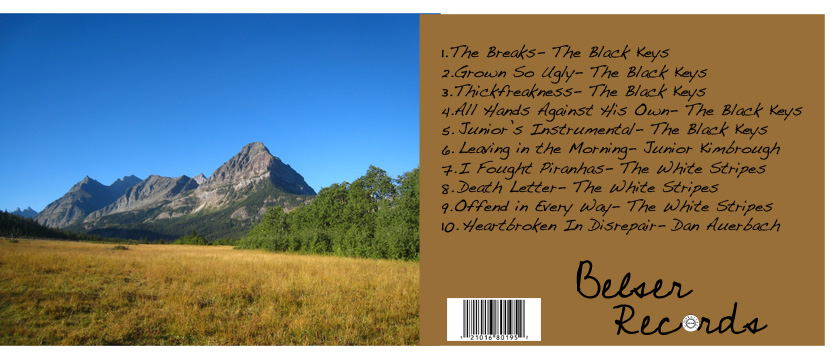
 My CD Cover kind of reflected on what was used in order to create this music. I put the mountain pictures on there just because I like them. I am pretty happy with how this turned out .
McKenna's CD

 I didn't know what kind of album to make for this project, so I made a soundtrack to my life and what music describes who I am. The pictures all reflect me and what I like. I really liked this project a lot and may try doing it again in the future.
My CD Art


Just kind of created the art to match the music. There are some images that directly correlate with a song. It was a fun project, definitely would do it again.
Punny Funny :D

Thursday, October 6, 2011
Wednesday, October 5, 2011
Callee's Poop

Its what my mom calls me sometimes, so i doodled it :P i think its a WIN to the MAX!!!
Headphones-Visual Pun

My visual pun was headphones, and I drew a person with an old school phone on his head to visualize this pun. There wasn't much of an inspiration, I was just looking through a bunch of visual puns and this one caught my eye and I thought to myself, this is a good one. First I drew the image on paper then did a new copy in ink. After that i had it scanned to the computer and started using a tablet to paint and create highlights to the photo.This assignment was kind of hard because the tablet took a bit to get used to but overall was very cool and a new experience.
Visual Pun

I was inspired to use this pun for my project when one of my friends told it to me on my way from school. It is this," The Eye in the sky sees all". I thought it very unigue and mannipulable.
Tuesday, October 4, 2011
Jamie's Cd


My Cd project was just something I was already working on and I didn't know what to do with it and when Mr.Elmore said "CD project" I was like awesome Ill use my Picture for it


Monday, October 3, 2011


I needed to something professional. I had an idea for a tribal phoenix for an album cover for a while, so I now have one for my promo CD. It's only a promo CD because I wish to release a high-quality 2 Disc debut album sometime in 2016. The process was done entirely on Photoshop for image editing along with adding a cool "metal" texture to not only the tribal phoenix but also the fonts. I thought it was clever to use a barcode font on the backside! The big issue was printing. Everything else was easy!

Friday, September 30, 2011
Spontanious Audio


This was my first illustration on the computer. I took some elements from it and put on a glowing filter. I liked how it looked like a light show or a party. The songs I picked out are more upbeat and generally songs that make me happy.

Tuesday, September 27, 2011


CD Package and Illustration Instructions
Digital Illustration – Visual puns
1. Research Visual puns and create a list of ideas in a word document.
2. Draw 3 or more small drawings that communicate your idea in stick figures
3. Watch this video to get an idea of the digital painting process. You will have to choose to use either pencil or ink for this drawing. CLICK HERE
4. Draw final image on white copy paper – choose either ink or graphite
5. Scan in the Library and place image on Art server in your folder. Follow these instructions

6. Import to Photoshop
7. Begin painting
8. Post to blog and reflect on process and inspiration
Cd Package Design – Cd Album Covers
1. Find cd album covers that are inspirational and place in folder. Check out Disc Makers website
2. Write out a playlist of 10+ songs
3. Retrieve CD covers documents from the Photoshop resource folder on the server
4. Begin to locate high resolution (large images) from Free Public Domain Image Websites.
5. Start placing, arranging and manipulating images into cd
6. Create a Cd Title
7. Add play lists and bar code image
8. Print a black and white maquette and cut to check size
9. Print full color in library
10. Cut images, assemble and take product photos
11. Edit Product photos
12. Post images and reflect on process and inspiration
1. Research Visual puns and create a list of ideas in a word document.
2. Draw 3 or more small drawings that communicate your idea in stick figures
3. Watch this video to get an idea of the digital painting process. You will have to choose to use either pencil or ink for this drawing. CLICK HERE
4. Draw final image on white copy paper – choose either ink or graphite
5. Scan in the Library and place image on Art server in your folder. Follow these instructions

6. Import to Photoshop
7. Begin painting
8. Post to blog and reflect on process and inspiration
Cd Package Design – Cd Album Covers
1. Find cd album covers that are inspirational and place in folder. Check out Disc Makers website
2. Write out a playlist of 10+ songs
3. Retrieve CD covers documents from the Photoshop resource folder on the server
4. Begin to locate high resolution (large images) from Free Public Domain Image Websites.
5. Start placing, arranging and manipulating images into cd
6. Create a Cd Title
7. Add play lists and bar code image
8. Print a black and white maquette and cut to check size
9. Print full color in library
10. Cut images, assemble and take product photos
11. Edit Product photos
12. Post images and reflect on process and inspiration
Monday, September 26, 2011
Photomontage

- I chose this because I was thinking of a pirates of the caribbean. So I added the skuls and scary ship. The end(:
Friday, September 23, 2011
PhotoShop Tutorial

And I used the same picture for the dancer.. Because I couldn't find another good dancer picture.
I think it turned out really cool!
And the tutorial was fun :3
Strange floating head
 So... i dont understand why the tutorial thing had me make a floating head but I guess it works?

City

I just made this because I thought it would be cool. I just made it completely random. I really like how it turned out.
Photomontage

Subscribe to:
Posts (Atom)